
Table of Contents
ToggleWebflow vs WordPress: No-Code Design vs. Open-Source Power
Understanding the Basics
Webflow is a company that started in 2013. This is a tool that helps people make websites. It has things that help with design. It also has things that help with managing the website and hosting. Webflow is great for designers who want to make their website look perfect.
They do not have to write any code to do this. Using Webflow is, like renting a place to live where everything is taken care of for you. Webflow is easy to use. You do not own the website like you would if you made it yourself.
WordPress is the content management system. It is used by than 43 percent of all websites on the internet. WordPress is something that anyone can use for free because it is source. WordPress has been around since 2003.
When you use WordPress you have control over your website but you have to take care of your own hosting, security and maintenance. WordPress is like a house that you own. You have control over WordPress but you are responsible, for everything that happens with your WordPress website.
The Design Experience
Webflow does things in a different way. They have 2,000 templates you can use. At first it might seem like that is not a lot of options. The thing about Webflow is that it gives you complete control over how everything looks on your webpage. You can use ways of doing things with CSS like flexbox and grid to make your webpage look great on any device.
The Learning Curve
WordPress is a choice for people who are new to this. It is really easy to use especially when you are working with content. You can easily put up a theme write a blog post and manage your pages. The part of WordPress where you control everything is simple to understand.
There are also a lot of people who use WordPress. They can help you if you need it. If you want to make big changes, to your site you might have to use special tools or even learn some coding. WordPress makes it easy to do the things but WordPress also requires some work if you want to make it really special.
Maintenance and Updates
When you have a WordPress site you have to take care of it. You need to update WordPress itself your theme and all the plugins you use. Most of the time, website maintenance is easy to do. Sometimes they can cause problems or stop things from working properly.
Webflow takes care of everything for you. It makes updates without you noticing Webflow has security built right in and Webflow makes sure your website is running quickly.
For a lot of people not having to worry about these things is a plus even if Webflow costs a bit more. You can spend your time making your website look good and putting up content instead of dealing with technical stuff.
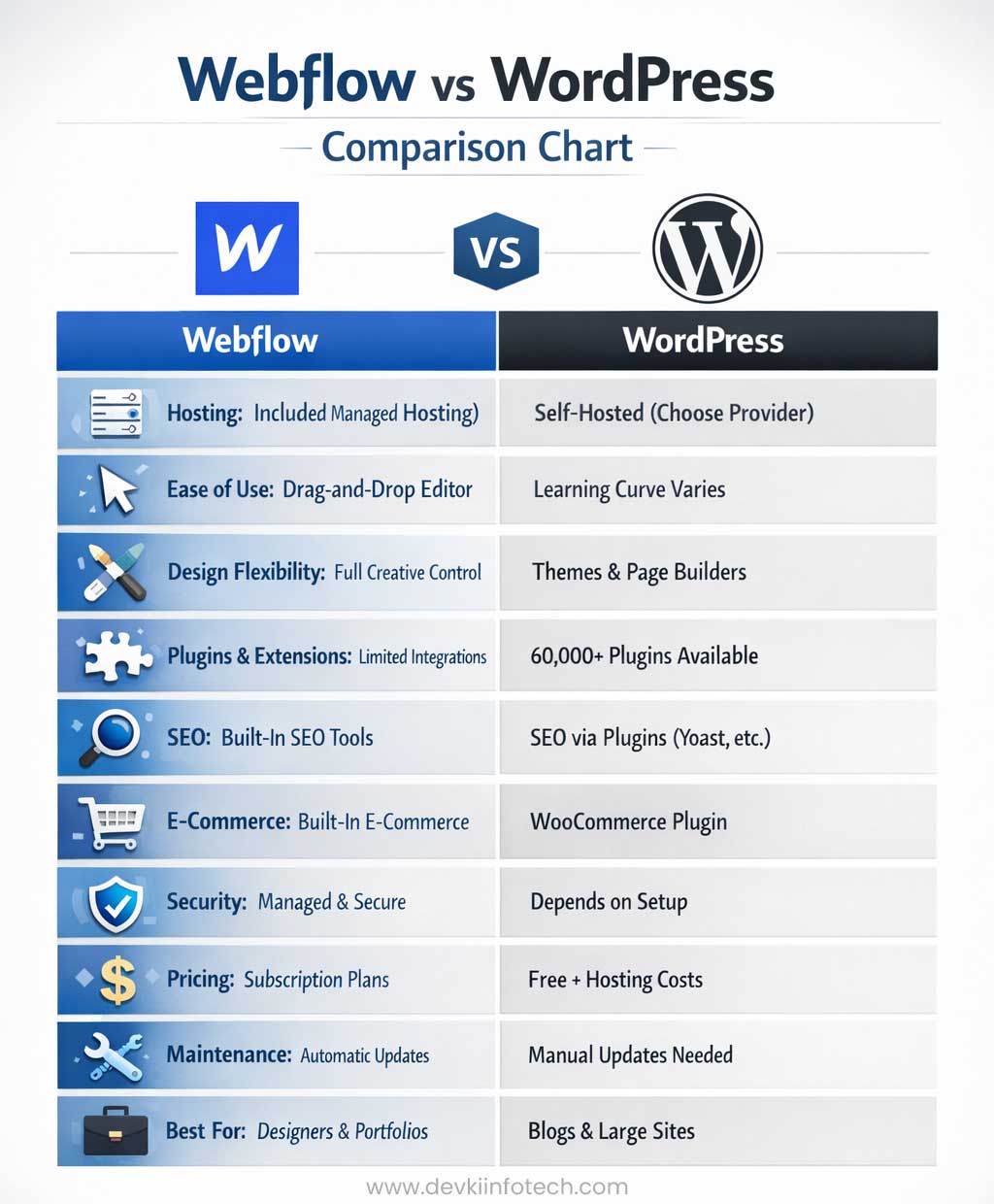
Webflow vs WordPress - Comparison Chart
| Feature / Category | Webflow | WordPress |
|---|---|---|
| Type & Approach | Visual-first no-code website builder with CMS | Open-source CMS with huge flexibility via plugins & themes |
| Hosting | Included with plans (managed, AWS-backed) | Not included — must choose external hosting provider |
| Ease of Use | Intuitive drag-and-drop visual editor | Easy for basic content; professional custom builds can be complex |
| Design Flexibility | Full creative control & pixel-perfect layouts | Very flexible via themes + page builders (Elementor/Divi) |
| Customization | Good but fewer integrations/extensions | Extremely customizable via ~60,000+ plugins |
| SEO Tools | Built-in SEO features | SEO via plugins like Yoast, Rank Math |
| Content Management | CMS built into editor; good for structured content | Powerful CMS for blogs, large sites, multi-author workflows |
| Plugins/Extensions | Limited 3rd-party integrations | Vast ecosystem (SEO, security, e-commerce, membership, etc.) |
| Security | Managed platform with built-in protections | Depends on hosting + plugins; needs active maintenance |
| Performance | Optimized hosting & clean code output | Performance varies with host, plugins & optimization |
| E-Commerce | Built-in on higher plans (good for small stores) | Via plugins (like WooCommerce) with advanced features |
| Pricing | Subscription plans with hosting included | Free core + separate costs for hosting, plugins, themes |
| Maintenance | Minimal — platform handles updates/backups | Requires regular software, plugin & backup upkeep |
| Best Suited For | Designers, agencies, marketing sites, portfolios | Blogs, complex sites, large communities, scalable e-commerce |
Quick Summary
Webflow is great if you want:
 Visual design control without coding Hosting & security included Lower maintenance burden
 WordPress is better when you need:
Maximum extensibility & plugin ecosystem Advanced content management Full control over hosting & features
Cost Considerations
The budget is really important when you are trying to decide on Webflow vs WordPress platform. You have to think about how money you want to spend on the platform. The budget will help you figure out which platform is the best, for you.
WordPress is free. That is really good. You do have to pay for some things though like hosting, which can be around five to ten dollars per month. You also have to pay for a domain name. Maybe some special themes or plugins for WordPress.
If you want a WordPress site it will probably cost you around one hundred to two hundred dollars per year. If you want a bigger business site with lots of extra tools it can cost a lot more like five hundred to one thousand dollars per year. WordPress can get pretty expensive especially if you want a lot of features, for your WordPress site.
Webflow costs $14 per month for a website with hosting. The price can go up really fast. If you want a website with pages or better features or if you want to sell things online it can cost $29, $49 or even more, per month. For a business website that needs code and extra features it can cost $600 or more per year for Webflow. Webflow can get expensive if you need a lot of things.
E-commerce Capabilities
WordPress has a great way to sell things online through WooCommerce. You can use it to sell all sorts of things like products, digital downloads and even subscriptions. There are a lot of extras you can add to make it work the way you want. You can use payment methods and things like that.
The thing, about WordPress and WooCommerce is that you can do anything you want with it. Sometimes it can be hard to get everything set up just right. WordPress and WooCommerce are very flexible which is nice. That also means it can be a bit complicated to get started with WordPress and WooCommerce Website Design.
Making Your Decision
So the question is, Webflow vs WordPress which platform is the one for you to use? When it comes to choosing a platform you have to think about what you want to do with it. Do you want to use the platform for work or, for fun? The platform you choose will depend on what you need it for. You should think about what you want to get out of the platform.
Choose WordPress if you:
- Want maximum flexibility and control over every aspect of your site
- Plan to run a content-heavy blog or news site
- Need advanced e-commerce features
- Prefer lower upfront costs and don’t mind handling maintenance
- Have specific plugin requirements or integrations
- Want access to a massive community and extensive documentation
Choose Webflow if you:
- Value design freedom and want pixel-perfect control
- Prefer an all-in-one solution with minimal technical maintenance
- Are comfortable with a visual design interface
- Want fast performance and modern design capabilities out of the box
- Don’t mind paying more for convenience and peace of mind
- Need a portfolio or marketing site rather than complex e-commerce
Key Differences:
- When it comes to control WordPress gives you power over everything, including the code and the database. On the hand Webflow provides a lot of control over the visual aspects but you have to work within their platform to get that control. Webflow is about giving you deep visual control but WordPress is the one that gives you total control, over the code and database.
- So when you use Webflow it is already set up to build and host your website. On the hand WordPress is different. You need to set up and host it separately. Webflow is a lot easier to use because it does everything for you.
- With WordPress you have to find your own hosting and set it up which can be a bit of a hassle. Webflow is really convenient because it takes care of the building and hosting for you.
- When it comes to the ecosystem WordPress is the winner because it has a huge number of plugins. We are talking about more, than 60 thousand. On the hand Webflow has fewer plugins but the ones it has are really good and carefully chosen. WordPress plugins are just so many. That is a big advantage. Webflow has a selection of apps but they are all high quality.
- Core Strength: Webflow = Design; WordPress = Content.
Frequently Asked Questions - To provides a comprehensive review of Webflow versus WordPress
Q1. What is better Webflow or WordPress?
Q2. Is Webflow easier than WordPress?
Q3. How much does Webflow cost compared to WordPress?
Q4. Can I use Webflow for e-commerce?
Q5. Which platform is better for SEO?
Q6. Do I need coding skills for Webflow or WordPress?
Q7. What are the main disadvantages of Webflow?
Q8. What are the main disadvantages of WordPress?
Partner with Devki Infotech: Leading WordPress Developers in Mumbai, India
With over 15 years of industry experience, we understand that a website is more than just an online brochure—it is a powerful tool for growth. Devki Infotech Website Designers in Andheri, Mumbai. Specialises in delivering end-to-end WordPress services tailored to the competitive Indian market.
Our Expert WordPress Services include:
- Custom WordPress Development: We don’t just use templates; we build unique, brand-aligned websites that stand out.
- E-commerce Solutions (WooCommerce): Creating robust online stores with secure payment gateways and seamless user experiences.
- SEO-Optimized Architecture: Every site we build is structured to rank, helping you dominate search results in Mumbai and beyond.
- Mobile-First Design: Ensuring your website looks and functions perfectly on smartphones, tablets, and desktops.
- Plugin & Theme Customization: Tailoring functionality to your specific business needs without compromising on speed.
- Maintenance & Security: Providing ongoing support, regular updates, and high-level security to keep your site running smoothly 24/7.
Why Choose Devki Infotech?
As a trusted name and listed amongst top web development companies in India, we take pride in our transparent process and client-centric approach. Whether you are a startup looking for your first site or an established enterprise needing a revamp, Devki Infotech provides the technical expertise and local market insight to ensure your WordPress site delivers real results.
Ready to Build Your Dream Website? Let’s Get Started!
Whether you need the custom design flexibility of Webflow or the robust power of WordPress, our expert developers are here to turn your vision into a digital masterpiece.
Why wait? Your business deserves a website that works as hard as you do.
Get a Free Consultation: Not sure which platform is right for you? Let’s discuss your goals.
Request a Custom Quote: Transparent pricing tailored to your specific project needs.
Expert Support: From development to maintenance, we’ve got you covered.
Our Recommendations:
- Webflow: Visual development, clean code, managed hosting, no-code interactions.
- WordPress: Open-source CMS, plugin library, Gutenberg editor, self-hosted.
- Comparison: Learning curve, pricing plans, security, and scalability.
The Bottom Line
Answering these questions honestly, and your choice will become clear. Both platforms have powered countless successful websites—the right one for you depends entirely on how you work and what you’re trying to build.
Search for Webflow vs WordPress
Webflow vs wordpress, best website builder 2025, wordpress or webflow, webflow comparison, wordpress alternatives, no code website builder, cms platform comparison, website builder for beginners, webflow pros and cons, wordpress pricing, web design platform, website hosting solutions, e-commerce website builder, webflow vs wordpress speed, drag and drop website builder, content management system, wordpress vs webflow seo, best platform for portfolio website, business website builder, webflow vs wordpress cost, website design cost calculator